|
| This is a topic that has been causing confusion ever since scanners became available for digitising colour transparencies. Things have changed only a little and confusion remains an ever-present blot on the plot.
For pixels, the simplified versions runs something like this:
Images are made from pixels. A pixel is an area within an image defined by its size, location and colour. Colour is defined as three values: one each for red, green and blue. The size of an image file, as seen by a computer, is found by multiplying the number of pixels across the width, by the number of pixels down the side, then multiplying that number by three (once each for red, green and blue). That is all that a computer cares about, how many pixels, where they are and what colour they are. The physical size of an image (that is how many inches wide by how many inches deep, only comes into play when the numbers from the file are arranged into a picture, be that on screen or printed to a piece of paper.
That is the first time that ‘resolution’ comes into the frame, we have to know how many pixels to allocate to each inch of length in a picture (despite metrication, resolution is firmly entrenched in the imperial system, it’s always pixels per inch – very rarely pixels per cm).
Our troubles are just starting! We are now in what is technically called ‘device dependent’ territory. Adobe InDesign, Photoshop and Internet explorer all handle pixels and resolution in different ways. If you view, or print, from each program the image will appear in physically different sizes. InDesign honours the physical size – a 6x4 inch print is fitted onto the page at that size; Internet Explorer simply counts pixels then shows as much of the image as will fit onto the screen; Photoshop is something of a hybrid and scales the image according to instructions from other parts of the program.
Printer drivers are more specific, they care about pixel count but only stretch or compress file sizes when asked to do so. The printer driver needs to be given the physical size of print required. It then scales pixels to make the best job that it can; if there are insufficient pixels to do a decent job, the printer carries on regardless!
By now we are firmly in confusion territory and if your eyes have glazed over then here is a simple table which defines how big your file should be (as measured when open in Photoshop but without any layers) to produce a half-decent print.
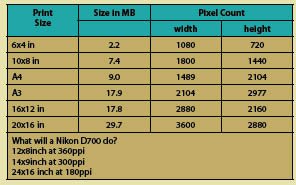
Looking at the numbers tells us that a modern DSLR will make a 16x20 inch print if you accept printing at 180ppi image resolution (more on that later).
Page 1- Page 2 - Page 3

|
