Architecture Photographic Competition 3rd Place

View all images entered click here: "Architecture" Image Competition

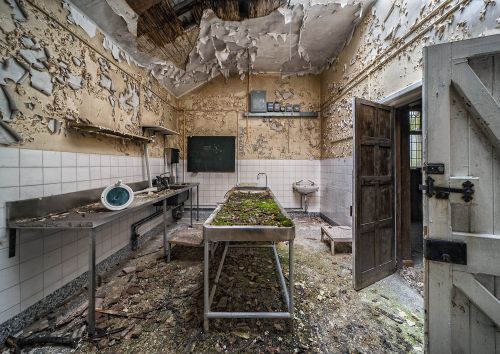
Congratulations to Ed Brandon on this image entitled "Military Hospital Mortuary". Ed from Peterborough, Cambridgeshire has won 6 months membership to The Society of International Travel & Tourism Photographers.

Ed explains a bit in his image "The military hospital in question was built in 1879 and used to treat troops in the Boer War, as well as both first and second World Wars. It was the first hospital the UK to use plastic surgery, for those injured at the Battle of the Somme. It has been abandoned since 1996 but is still generally intact and could make for a stunning restoration project."

Camera: Nikon D700
Lens: Sigma 12-24mm f/4.5-5.6
ISO 200
f/8
  • Architecture Photography Competition


1st place see HERE
2nd place see HERE
3rd place see HERE
Highly commended images see HERE


SICIP Sponsor Banner Control Panel 1.7

SICIP Sponsor Banner Control Panel 1.7

Error:


Script Error

Error:

Can't verify file locking - aborting.

Make sure the following has been observed:

Unix Servers:
  • sponsorban.cgi is writable by this script
  • If a file locking problem, make sure the directory this script resides in is writable. Note, the directory does not have to be writable for the script to write to files, only for it to create files. File creation is required for proper file locking.
Windows NT systems:
  • sponsorban.cgi must be writable and accessible by the script
  • banner.cgi must be able to write to files and create files
  • On some NT systems, the variable near the top of banner.cgi must be set. It is currently set as follows:
      $main::sponsorban_path = "sponsorban";
    Note that under most systems, "." is fine. This specifies that it is set to the current directory. However, some NT systems require the full server path. Contact your system administrator to find the full path to your cgi-bin directory.
If you still have trouble, contact Banner@linc2u.com and I will attempt to help.

Software

Main Menu | Add Banners. Log Out
2000 Software

Right Column Banner root pages
Sponsor Banner root pages - ACTIVE

Content-type: text/html Fast and intuitive, PortraitPro intelligently enhances every aspect of a portrait for beautiful results. Expires: Mon, 26 Jul 2001 05:00:00 GMT Pragma: no-cache Cache-Control: no-cache, must-revalidate Content-type: text/html SICIP Sponsor Banner Control Panel 1.7

SICIP Sponsor Banner Control Panel 1.7

Error:


Script Error

Error:

Can't verify file locking - aborting.

Make sure the following has been observed:

Unix Servers:
  • sponsorban.cgi is writable by this script
  • If a file locking problem, make sure the directory this script resides in is writable. Note, the directory does not have to be writable for the script to write to files, only for it to create files. File creation is required for proper file locking.
Windows NT systems:
  • sponsorban.cgi must be writable and accessible by the script
  • banner.cgi must be able to write to files and create files
  • On some NT systems, the variable near the top of banner.cgi must be set. It is currently set as follows:
      $main::sponsorban_path = "sponsorban";
    Note that under most systems, "." is fine. This specifies that it is set to the current directory. However, some NT systems require the full server path. Contact your system administrator to find the full path to your cgi-bin directory.
If you still have trouble, contact Banner@linc2u.com and I will attempt to help.

Software

Main Menu | Add Banners. Log Out
2000 Software

Right Column Banner root pages
Sponsor Banner root pages - ACTIVE

Expires: Mon, 26 Jul 2001 05:00:00 GMT Pragma: no-cache Cache-Control: no-cache, must-revalidate Content-type: text/html SICIP Sponsor Banner Control Panel 1.7

SICIP Sponsor Banner Control Panel 1.7

Error:


Script Error

Error:

Can't verify lock file for cleanup - aborting.

Make sure the following has been observed:

Unix Servers:
  • sponsorban.cgi is writable by this script
  • If a file locking problem, make sure the directory this script resides in is writable. Note, the directory does not have to be writable for the script to write to files, only for it to create files. File creation is required for proper file locking.
Windows NT systems:
  • sponsorban.cgi must be writable and accessible by the script
  • banner.cgi must be able to write to files and create files
  • On some NT systems, the variable near the top of banner.cgi must be set. It is currently set as follows:
      $main::sponsorban_path = "sponsorban";
    Note that under most systems, "." is fine. This specifies that it is set to the current directory. However, some NT systems require the full server path. Contact your system administrator to find the full path to your cgi-bin directory.
If you still have trouble, contact Banner@linc2u.com and I will attempt to help.

Software

Main Menu | Add Banners. Log Out
2000 Software

Right Column Banner root pages
Sponsor Banner root pages - ACTIVE


Corporate Partners

Aaduki Photographic Insurance Elinchrom Studio & Portable Lighting MPB