

articles/Software/stitcher2009-page2

Autodesk Stitcher 2009 - part 2 of 1 2 3 4

by Andrew Williams Published 01/04/2009
stitcher2009-03.jpg

Timings:

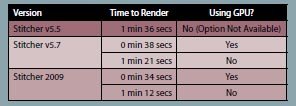
As Stitcher can use the processing power in your graphics card (GPU) to speed up rendering I have repeated the test with and without the GPU enabled.

As you can see, Stitcher 2009 is the fastest version yet and using the CPU in your graphics card makes a large difference in rendering times, reducing the time by over 50%.

stitcher2009-04.jpg

Although Autodesk quickly released an update Version 5.7.1, version 2009 is the first major release under the new owners, so I was very interested to see what new features Autodesk has added. I was a bit disappointed to learn that there were only three new features that did not appear in version 5.7.

1. Support for the Sunex lens

The addition of specific distortion parameters for the Sunex fish-eye lens. This is a lens with a 185° field of vision designed for the smaller sensors of cameras such as the Nikon D200 or Canon 50D. The lens has a fixed aperture of f/5.6 and a fixed focal length of 5.6mm. For further details and prices, see www.360tacticalVR.co.uk. In general Stitcher works well with fisheye lenses but I don't use this lens so I cannot confirm how well this feature works.


Please Note:
There is more than one page for this Article.
You are currently on page 2 Contact Andrew Williams

1st Published 01/04/2009
last update 21/07/2022 08:46:26

More Software Articles


There are 0 days to get ready for The Society of Photographers Convention and Trade Show at The Novotel London West, Hammersmith ...
which starts on Wednesday 14th January 2026


sicip Right Column Banner Max 200 pix wide Control Panel 1.6

sicip Right Col Banner Max 200 pix wide Control Panel 1.6

Error:


Script Error

Error:

Can't verify file locking - aborting.

Make sure the following has been observed:

Unix Servers:
  • rightcolban.cgi is writable by this script
  • If a file locking problem, make sure the directory this script resides in is writable. Note, the directory does not have to be writable for the script to write to files, only for it to create files. File creation is required for proper file locking.
Windows NT systems:
  • rightcolban.cgi must be writable and accessible by the script
  • banner.cgi must be able to write to files and create files
  • On some NT systems, the variable near the top of banner.cgi must be set. It is currently set as follows:
      $main::rightcolban_path = "rightcolban";
    Note that under most systems, "." is fine. This specifies that it is set to the current directory. However, some NT systems require the full server path. Contact your system administrator to find the full path to your cgi-bin directory.
If you still have trouble, contact Banner@linc2u.com and I will attempt to help.

Software

Main Menu | Add Banners. Log Out
2000 Software

Header Banner root pages
Right Column Banner root pages - ACTIVE
Sponsor Banner root pages

Content-type: text/html Fast and intuitive, PortraitPro intelligently enhances every aspect of a portrait for beautiful results. Expires: Mon, 26 Jul 2001 05:00:00 GMT Pragma: no-cache Cache-Control: no-cache, must-revalidate Content-type: text/html sicip Right Column Banner Max 200 pix wide Control Panel 1.6

sicip Right Col Banner Max 200 pix wide Control Panel 1.6

Error:


Script Error

Error:

Can't verify file locking - aborting.

Make sure the following has been observed:

Unix Servers:
  • rightcolban.cgi is writable by this script
  • If a file locking problem, make sure the directory this script resides in is writable. Note, the directory does not have to be writable for the script to write to files, only for it to create files. File creation is required for proper file locking.
Windows NT systems:
  • rightcolban.cgi must be writable and accessible by the script
  • banner.cgi must be able to write to files and create files
  • On some NT systems, the variable near the top of banner.cgi must be set. It is currently set as follows:
      $main::rightcolban_path = "rightcolban";
    Note that under most systems, "." is fine. This specifies that it is set to the current directory. However, some NT systems require the full server path. Contact your system administrator to find the full path to your cgi-bin directory.
If you still have trouble, contact Banner@linc2u.com and I will attempt to help.

Software

Main Menu | Add Banners. Log Out
2000 Software

Header Banner root pages
Right Column Banner root pages - ACTIVE
Sponsor Banner root pages

Expires: Mon, 26 Jul 2001 05:00:00 GMT Pragma: no-cache Cache-Control: no-cache, must-revalidate Content-type: text/html sicip Right Column Banner Max 200 pix wide Control Panel 1.6

sicip Right Col Banner Max 200 pix wide Control Panel 1.6

Error:


Script Error

Error:

Can't clean lock file - aborting.

Make sure the following has been observed:

Unix Servers:
  • rightcolban.cgi is writable by this script
  • If a file locking problem, make sure the directory this script resides in is writable. Note, the directory does not have to be writable for the script to write to files, only for it to create files. File creation is required for proper file locking.
Windows NT systems:
  • rightcolban.cgi must be writable and accessible by the script
  • banner.cgi must be able to write to files and create files
  • On some NT systems, the variable near the top of banner.cgi must be set. It is currently set as follows:
      $main::rightcolban_path = "rightcolban";
    Note that under most systems, "." is fine. This specifies that it is set to the current directory. However, some NT systems require the full server path. Contact your system administrator to find the full path to your cgi-bin directory.
If you still have trouble, contact Banner@linc2u.com and I will attempt to help.

Software

Main Menu | Add Banners. Log Out
2000 Software

Header Banner root pages
Right Column Banner root pages - ACTIVE
Sponsor Banner root pages

Expires: Mon, 26 Jul 2001 05:00:00 GMT Pragma: no-cache Cache-Control: no-cache, must-revalidate Content-type: text/html sicip Right Column Banner Max 200 pix wide Control Panel 1.6

sicip Right Col Banner Max 200 pix wide Control Panel 1.6

Error:


Script Error

Error:

Can't verify lock file for cleanup - aborting.

Make sure the following has been observed:

Unix Servers:
  • rightcolban.cgi is writable by this script
  • If a file locking problem, make sure the directory this script resides in is writable. Note, the directory does not have to be writable for the script to write to files, only for it to create files. File creation is required for proper file locking.
Windows NT systems:
  • rightcolban.cgi must be writable and accessible by the script
  • banner.cgi must be able to write to files and create files
  • On some NT systems, the variable near the top of banner.cgi must be set. It is currently set as follows:
      $main::rightcolban_path = "rightcolban";
    Note that under most systems, "." is fine. This specifies that it is set to the current directory. However, some NT systems require the full server path. Contact your system administrator to find the full path to your cgi-bin directory.
If you still have trouble, contact Banner@linc2u.com and I will attempt to help.

Software

Main Menu | Add Banners. Log Out
2000 Software

Header Banner root pages
Right Column Banner root pages - ACTIVE
Sponsor Banner root pages