

.


articles/Lens/50-150mm-page3
by Mike McNamee Published 01/08/2012
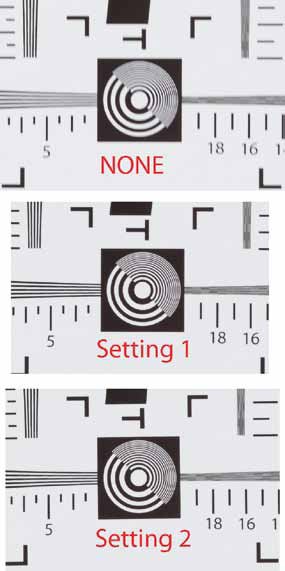
The shots were moderately sharpened in Bridge/ACR and then examined in bridge with the lope tool of ACR. They were simply designated as 'OK' or 'fuzzy' - one unstablised shot was very poor, but the sharp ones were easy to pick out. Without OS, 8 out of 10 shots were fuzzy. With OS Setting 1 only three out of 10 were fuzzy and with Setting 2 five out of 10 were fuzzy. The message then is that the OS improves the success rate but at this setting combination is not fool proof. The tests certainly highlighted that the combination of the lens, D700 and a full MB10 Battery pack (with both NiH and 8 AA cells) is rather heavy for smaller photographers (includes many women plus your rather tiny editor!). Either way it is obviously worth having stabilisation on your side.
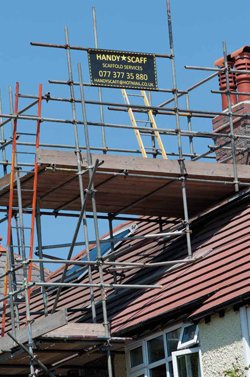
And we only wanted a new TV Aerial! Nikon D700 1/400 f10.0, ISO 320, 150mm focal length at 21m distance. Uncropped at 300ppi.
Olympic Torch
We took the lens along to the Olympic Torch event. Attached to a Nikon D200, it performed reasonably well with most of the issues coming from the huge crowds holding their mobile phones above their heads. It also provided the opportunity for some action shots to explore the speed of the auto focus.
There are 0 days to get ready for The Society of Photographers Convention and Trade Show at The Novotel London West, Hammersmith ...
which starts on Wednesday 14th January 2026
Error:Can't verify file locking - aborting.Make sure the following has been observed: Unix Servers:
Software |
Header Banner root pages
Right Column Banner root pages - ACTIVE
Sponsor Banner root pages
 Expires: Mon, 26 Jul 2001 05:00:00 GMT
Pragma: no-cache
Cache-Control: no-cache, must-revalidate
Content-type: text/html
Error:Can't verify lock file for cleanup - aborting.Make sure the following has been observed: Unix Servers:
Software |
Header Banner root pages
Right Column Banner root pages - ACTIVE
Sponsor Banner root pages

Society of International Commercial and Industrial Photographers (SICIP) is a trading name of BPPA Ltd
The Society of Photographers
Clwyd Chambers, Clwyd Street, Rhyl, Denbighshire, LL18 3LA
BPPA Ltd Company Reg 0392 2894
VAT number 790 4289 05
Tel: +44 1745 356935


Home Page - Find a Photographer - Benefits of Membership - Professional Imagemaker Magazine - FREE information pack - Privacy - London Photography Show Europe's Largest 'All-Welcome' Photographic Convention
Newsletter
Subscribe to the Societies Newsletter. Subscribe here.