
articles/Monitors/spectraview2690-page4

NEC SpectraView Reference 2690 - part 4 of 1 2 3 4 5

by Mike McNamee Published 01/06/2009

spectraview2690-07.jpg

Documentation

This is provided in book form (multi-lingual) running to 21 pages for each language and also on DVD. The literature was undated but had few references to Vista and so we went to the NEC website and downloaded NaViSet, which did carry a 'Vista compatible' tag. However, when we loaded the software it stopped the install with an error message to say the software is not Vista 64-bit compatible. Such issues should not affect the Mac-based, pre-press and graphics community!

spectraview2690-08.jpg

Gamut Volume Measurements

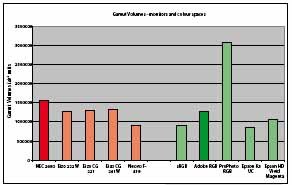
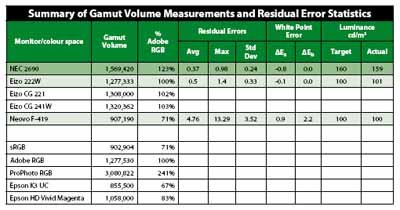
Analysis of the profile for the 2690 revealed some excellent statistics. The gamut volume is as high as claimed, indeed we exceeded the claims by some way. The data is tabulated. We measured a number of monitors, and the gamut volumes are compared with some of the common working colour spaces and the ability of the Epson ink sets. The 2690 commands a new record for measured gamut volume, the previous highest was the Eizo CG 241w at 1.3 million units. As far as we could tell the 2690 gamut completely swallowed that of the FOGRA 27 which is used for this magazine. It also came close to swallowing the massive gamut of the Epson 7900, the biggest we have measured on a printer to date - just a few darker greens and cyans got away.


Please Note:
There is more than one page for this Article.
You are currently on page 4 Contact Mike McNamee

1st Published 01/06/2009
last update 21/07/2022 08:46:26

More Monitors Articles


There are 0 days to get ready for The Society of Photographers Convention and Trade Show at The Novotel London West, Hammersmith ...
which starts on Wednesday 14th January 2026


sicip Right Column Banner Max 200 pix wide Control Panel 1.6

sicip Right Col Banner Max 200 pix wide Control Panel 1.6

Error:


Script Error

Error:

Can't verify file locking - aborting.

Make sure the following has been observed:

Unix Servers:
  • rightcolban.cgi is writable by this script
  • If a file locking problem, make sure the directory this script resides in is writable. Note, the directory does not have to be writable for the script to write to files, only for it to create files. File creation is required for proper file locking.
Windows NT systems:
  • rightcolban.cgi must be writable and accessible by the script
  • banner.cgi must be able to write to files and create files
  • On some NT systems, the variable near the top of banner.cgi must be set. It is currently set as follows:
      $main::rightcolban_path = "rightcolban";
    Note that under most systems, "." is fine. This specifies that it is set to the current directory. However, some NT systems require the full server path. Contact your system administrator to find the full path to your cgi-bin directory.
If you still have trouble, contact Banner@linc2u.com and I will attempt to help.

Software

Main Menu | Add Banners. Log Out
2000 Software

Header Banner root pages
Right Column Banner root pages - ACTIVE
Sponsor Banner root pages

Content-type: text/html Default Banner Expires: Mon, 26 Jul 2001 05:00:00 GMT Pragma: no-cache Cache-Control: no-cache, must-revalidate Content-type: text/html sicip Right Column Banner Max 200 pix wide Control Panel 1.6

sicip Right Col Banner Max 200 pix wide Control Panel 1.6

Error:


Script Error

Error:

Can't verify lock file for cleanup - aborting.

Make sure the following has been observed:

Unix Servers:
  • rightcolban.cgi is writable by this script
  • If a file locking problem, make sure the directory this script resides in is writable. Note, the directory does not have to be writable for the script to write to files, only for it to create files. File creation is required for proper file locking.
Windows NT systems:
  • rightcolban.cgi must be writable and accessible by the script
  • banner.cgi must be able to write to files and create files
  • On some NT systems, the variable near the top of banner.cgi must be set. It is currently set as follows:
      $main::rightcolban_path = "rightcolban";
    Note that under most systems, "." is fine. This specifies that it is set to the current directory. However, some NT systems require the full server path. Contact your system administrator to find the full path to your cgi-bin directory.
If you still have trouble, contact Banner@linc2u.com and I will attempt to help.

Software

Main Menu | Add Banners. Log Out
2000 Software

Header Banner root pages
Right Column Banner root pages - ACTIVE
Sponsor Banner root pages